6 available
Upload up to 16 reference images (PNG, JPG, WebP)
0 / 20000

Free users generate with a site watermark.

Upgrade to remove watermark
Cost 3 credits / Remaining — creditsBuy Credits ›

Reference images

Original sample images
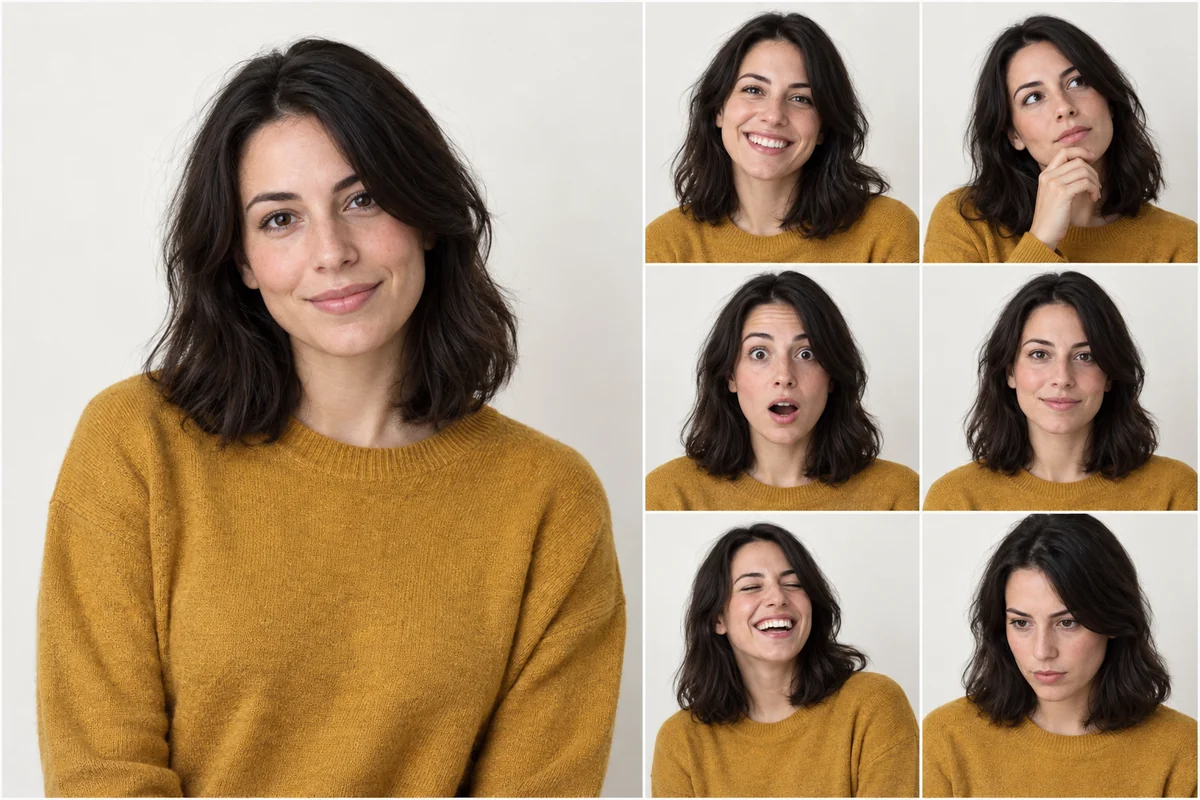
Photorealistic character sheet showing the same woman with five expressions
Important: Please stay on this page during image generation to prevent loss of generated content.

Edit and restyle your images with AI

Upload one or more images in the generator above, describe the change and pick a model. GPT Image 2 and 2.5 take up to 16 references, Nano Banana 2 up to 14, Nano Banana 2.1 up to 10 and Nano Banana Pro up to 8. Each result costs 3, 6 or 10 credits at 1K, 2K or 4K.

What is AI image to image?

Image to image uses the pictures you upload as references and generates a new image from them and your prompt: swap a background, restyle a photo, place a product in a new scene or combine several references into one picture. On seedance2video.ai it runs in the browser with five models at 3, 6 or 10 credits per image by resolution, matching the generator quote as of November 2026. seedance2video.ai is an independent creative workspace, not the official site of any model creator. The 50 signup credits are reserved for the Seedance 2.5 Mini video trial. Image generation uses your regular credit balance.

How to edit an image with AI

At least one reference image is required in this mode.

  1. 01

    Upload your reference images

    PNG, JPG or WebP, up to 30 MB each (50 MB on GPT Image 2). Start with the one image that matters most and add more only when you need them.

  2. 02

    Describe the change

    Say what must stay and what should change, for example: keep the bottle and its label, replace the background with a marble counter in morning light.

  3. 03

    Pick a model and resolution

    Every model costs 3 credits at 1K, 6 at 2K and 10 at 4K. Draft at 1K first.

  4. 04

    Generate, compare and download

    Stay on the page while it renders. Download the result or find it later in My Creations.

What the image to image tool gives you

Reference editing with the same price on every model.

Up to 16 references per edit

GPT Image 2 and 2.5 accept 16 images, Nano Banana 2 accepts 14, Nano Banana 2.1 accepts 10 and Nano Banana Pro accepts 8.

Same price as text to image

3 credits at 1K, 6 at 2K and 10 at 4K, whichever model you pick.

Transparent output

GPT Image 2.5 can return the edited image on a transparent background.

Saved in My Creations

Signed-in users can reopen and download every finished edit later.

Image to image models compared

SpecGPT Image 2.5Nano Banana 2.1Nano Banana 2Nano Banana ProGPT Image 2
Max reference images161014816
Max size per reference30 MB30 MB30 MB30 MB50 MB
Resolutions1K, 2K, 4K1K, 2K, 4K1K, 2K, 4K1K, 2K, 4K1K, 2K, 4K (no 4K at 1:1)
Credits per image (1K / 2K / 4K)3 / 6 / 103 / 6 / 103 / 6 / 103 / 6 / 103 / 6 / 10
Transparent backgroundYesNoNoNoNo
Good forPrecise edits and transparent assetsRegional edits, consistent subjectsFast 4K edits and many referencesComplex production editsGeneral edits (default model)

What image to image can and can’t do here

You can

  • Combine several references: Upload a product, a model shot and a background and describe how they fit together.
  • Change a background or style: Say what to keep and what to change; the model regenerates the image around it.
  • Use every model on a free account: Free accounts are not limited to one model. Their images carry a site watermark.
  • Edit up to 4K: All five models offer 4K for 10 credits per image; GPT Image 2 skips 4K at 1:1.

You can’t

  • Get a pixel-perfect retouch: Each result is a newly generated image, so small details can shift. It is not a layer-based photo editor.
  • Edit with Qwen Image 2.1 yet: It appears in the model menu but is not generating from this page yet.
  • Remove the watermark on a free account: Turning the watermark off needs a paid plan.
  • Animate the image here: For motion, take the result to Image to Video.

How much an AI image edit costs

Every model costs 3 credits at 1K, 6 at 2K and 10 at 4K, matching the generator quote as of November 2026; the number of references does not change the price. The $19.90 one-time pack has 200 credits that never expire, about 66 edits at 1K. Paid plans can turn the watermark off and include commercial-use rights. The 50 signup credits are reserved for the Seedance 2.5 Mini video trial. Image generation uses your regular credit balance.

See plans and credit packs

Which model to pick for an edit

Use GPT Image 2.5 for precise edits and transparent output, Nano Banana 2 when you need many references or fast 4K, Nano Banana 2.1 for regional edits and keeping a subject consistent, Nano Banana Pro for complex production work, and GPT Image 2 for general edits.

Read about Nano Banana 2.1

How to write an edit prompt

Start with what must not change (the product, the face, the logo), then the change itself, then lighting and framing. Use a sharp, well-lit reference, describe one change per pass, and check a 1K draft before you spend 6 or 10 credits on 2K or 4K.

Production edits with Nano Banana Pro

Nano Banana Pro is aimed at high-fidelity, complex production work. It takes up to 8 references, offers 10 fixed ratios plus Auto and costs the same 3, 6 or 10 credits as the other models.

Read about Nano Banana Pro

Turn the edited image into a video

Download the result and upload it in Image to Video. The 50 signup credits are reserved for the Seedance 2.5 Mini video trial. Image generation uses your regular credit balance.

Open Image to Video

Image to image FAQ

Can I edit an image with AI for free?

Image generation uses regular credits. The signup gift is reserved for the Seedance 2.5 Mini video trial.

How many reference images can I upload?

Up to 16 on GPT Image 2 and GPT Image 2.5, 14 on Nano Banana 2, 10 on Nano Banana 2.1 and 8 on Nano Banana Pro. Files can be PNG, JPG or WebP, up to 30 MB each, or 50 MB on GPT Image 2.

How many credits does an image edit cost?

3 credits at 1K, 6 at 2K and 10 at 4K on every model, no matter how many references you upload. This matches the generator quote as of November 2026, and the exact cost shows before you generate.

Which model is best for editing photos?

GPT Image 2.5 for precise edits and transparent backgrounds; Nano Banana 2 for many references and fast 4K; Nano Banana 2.1 for regional edits and consistent subjects; Nano Banana Pro for complex production work; GPT Image 2 for general edits. They all cost the same, so test two at 1K before you commit.

Will the edit keep my original image exactly?

Not pixel for pixel. Each result is a new image generated from your references and prompt, so small details can change. Say clearly what must stay the same, use a sharp reference, and compare a 1K draft before you pay for 2K or 4K.

Can I get the edited image on a transparent background?

Yes, with GPT Image 2.5: set Background to Transparent. The Nano Banana models and GPT Image 2 do not offer a transparent background option.

Do free images have a watermark, and can I use edits commercially?

Images from free accounts carry a site watermark. Every paid plan, from Mini at $29.90 a month, can turn the watermark off and includes commercial-use rights. You need the rights to every image you upload, including faces, logos and products.

Is this the official GPT Image or Nano Banana website?

No. seedance2video.ai is an independent creative workspace, not the official site of any model creator. It gives browser access to these image models, and the prices and limits on this page are this site’s own.

Edit your first image

Go back to the generator at the top of the page, upload a picture and describe the change.